
MCP for Adaptive Planning
Bringing Your AI to the Plan
Finance teams have spent the last couple of years watching AI assistants get better at nearly everything except the one thing they need most: knowing what is in the plan.

Finance teams have spent the last couple of years watching AI assistants get better at nearly everything except the one thing they need most: knowing what is in the plan. A general-purpose assistant can explain variance analysis, but it can't see your revenue driver model, your headcount plan, or the version your CFO signed off on last Tuesday. The Model Context Protocol (MCP) support in Workday Adaptive Planning is aimed at that gap.
The Three AI Levers in Adaptive
The architecture puts AI in two places. Inside Adaptive, it appears as Decision Intelligence and as predictive modelling. Outside, it arrives through MCP.
| Lever | Decision Intelligence | Predictive Modelling | MCP External AI |
|---|---|---|---|
| What it is | The AI experience embedded in Adaptive | Statistical and driver-based forecasting | A standard interface for outside AI agents to reach Adaptive |
| Capabilities | Conversational chatbot, dashboard building, scenario building | Statistical models on historical data, driver-based models linking outcomes to business drivers | Read access to planning data, metadata, model structure and formulas |
| Where users work | Inside Adaptive | Inside Adaptive's modelling and forecasting | In ChatGPT, Claude, Gemini or another MCP-capable agent |
| Can it change the plan? | Yes, it is native to the planning experience | Yes, it produces forecast outputs in the model | Not today: the current tools are read-only |
| Governed by | Adaptive permissions | Adaptive permissions | Same security model as the public APIs, with every call audited |
| Best for | Planners and finance users who want faster answers, dashboards and scenarios in the tool | Better forecast accuracy and understanding of what drives results | Combining plan context with outside data, and reaching people who don't live in Adaptive |
The key distinction is direction of travel. Decision Intelligence and predictive modelling act inside the governed environment, where they can build things and produce numbers. MCP works from the outside, reading governed data into someone else's workspace.
They are complementary rather than competing. Predictive modelling produces the forecast. Decision Intelligence lets planners interrogate it and build scenarios in-tool. MCP lets an external assistant pull that plan next to data Adaptive doesn't hold.
What Has Shipped
Workday Adaptive Planning now provides an MCP Server that lets customers' AI agents reach Adaptive Planning data and model context through a secure, standardized interface. The release notes list a Preview date of 15 August 2026 and a planned production date of 16 October 2026, and using it in Preview requires opting in to the Universal Main Service Agreement (UMSA).
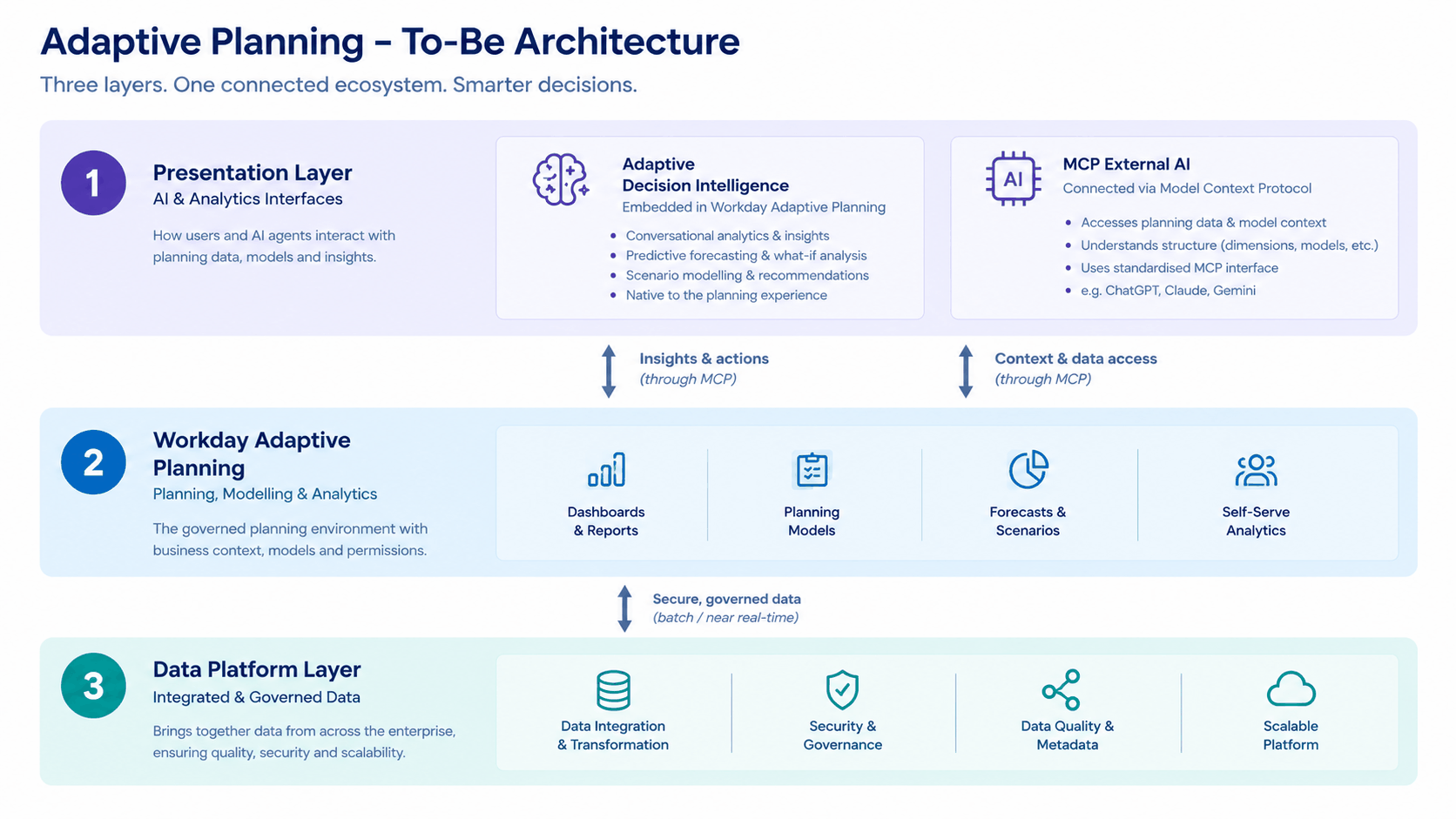
In the diagram below, this is the MCP External AI box in the Presentation Layer, sitting on the same governed planning layer that serves the native experience.
Why MCP Matters
Before MCP, connecting an AI tool to a planning system meant a custom integration each time: a bespoke script, a bespoke prompt, and a bespoke security review. MCP replaces that with one standard interface. Any MCP-capable client can connect the same way, which is why the diagram lists ChatGPT, Claude and Gemini side by side. Adaptive doesn't need to pick a winner in the assistant market. It only needs to be a good server.
Just as important is what the server exposes. Workday says agents can explore sheet data, metadata, versions, levels, dimensions and modeled sheet data within the user's permission scope. The tools cover dimensional data queries, metadata search, modeled sheet queries, listing sheets, retrieving a sheet's structure, and reading account formulas. An assistant that knows how dimensions roll up and how accounts are calculated can reason about the plan instead of guessing at a spreadsheet export.
It Is Read-Only Today
The current MCP server does not talk back to Adaptive. Every tool in the release notes retrieves information, and none writes values, creates versions or changes a model. The "Insights & actions" arrow in the diagram describes the direction of the architecture, not something available in the current release.
That has practical consequences:
- An external assistant can analyze and explain the plan, draft commentary, and reason about scenarios using the data it reads.
- It cannot build or save a scenario in Adaptive, update a forecast, or change an assumption.
- Anything the assistant produces lives in the assistant's workspace until a person carries it back into Adaptive, or uses Decision Intelligence to build it there.
This is a sensible starting point for financial data, and it makes the security conversation simpler. Write-back would be the next major step, and it would raise its own questions about approvals, version control and audit.
Governance Stays Intact
The obvious worry about connecting an external AI to planning data is control. MCP tool calls use the same security model as the public Adaptive Planning APIs, with permissions, access rules and MCP availability settings enforced on every call, and all calls recorded in the audit logs. The tools available also vary by the user's permissions, access rules and tenant configuration. In practice, the assistant sees what the connected user is allowed to see and nothing more, and there is a trail of what it did.
Setup is an admin task, not a toggle. Customers must configure authentication and connect agents to the correct regional MCP endpoint, with standalone instances registering an API client and Workday-enabled instances registering a client in Workday HCM or Financials.
What It Opens Up
Choosing the Right Lever
A simple rule of thumb:
Things to Get Right
MCP is a strong addition to the Adaptive toolkit, but its value depends on how well it is set up and where it sits alongside Decision Intelligence and predictive modelling. That is where Decision Inc. comes in. We help organisations work out which lever fits which problem, then put it in place properly: tightening roles and permissions so AI access reflects who should see what, configuring authentication and regional endpoints for MCP, and building the models, drivers and forecasts that give any AI something worth reading. We start with a small number of high-value use cases, such as faster variance commentary or scenario building in Decision Intelligence, and prove the value before scaling. We also help you plan for what comes next, including how to bring write-back and agentic workflows into the plan safely as they mature.
If you are considering how AI fits into your planning ecosystem, we would be glad to help you get from a good architecture on paper to decisions your teams can trust.
Bring Your AI to the Plan
Talk to us about which AI lever fits your planning problem, and how to put it in place properly.